


DesignSense AI
3.215.00 Reviews
App Specs
- Version
- 27
- Updated On
- License
- Free
- Downloads
- 100,000+
- Developer
- Sictec Infotech Inc.
- Categories
- Art & Design
- Platform
- Android
Screenshots
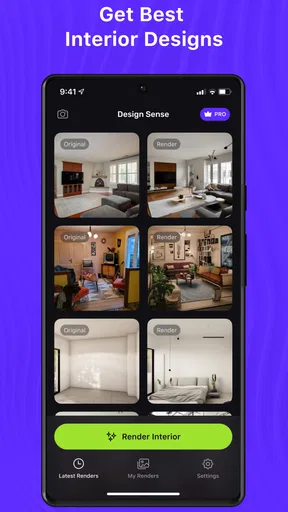
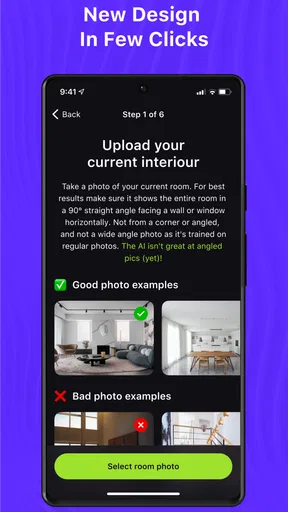
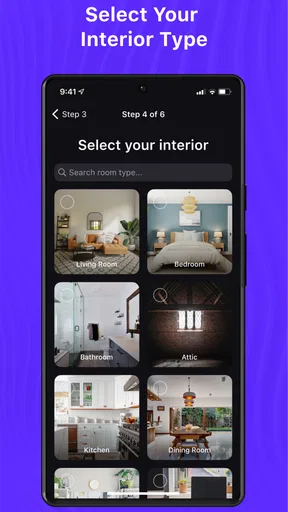
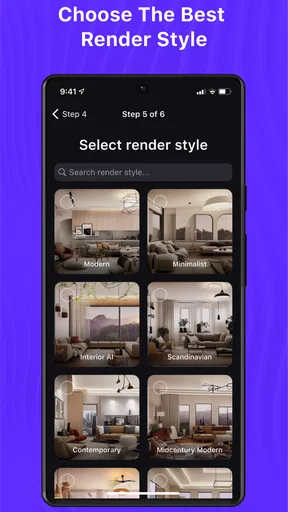
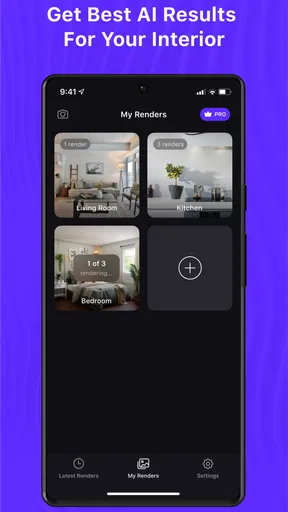
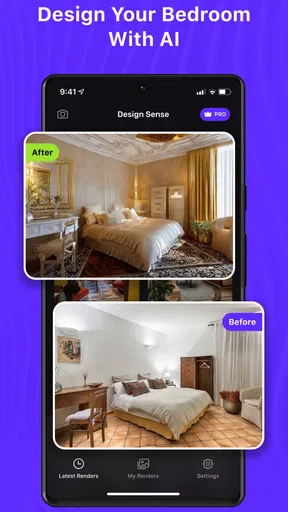
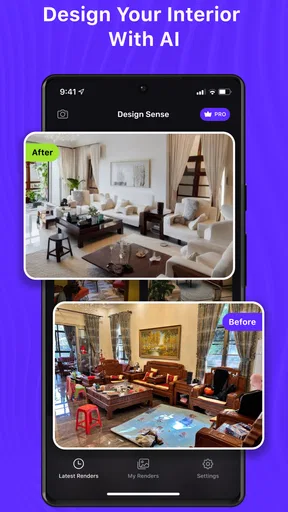
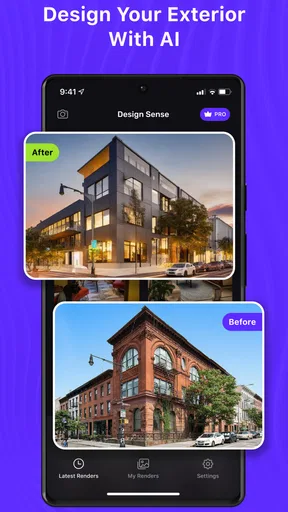
 Analysis by AppCompare
I approached DesignSense AI as a practical interior-design tool rather than a magic button that instantly solves a room. Its appeal is easy to understand: you want to explore a new look, but you may not know where to begin, what style suits the space, or whether a color idea will work outside your imagination. An app in the Art & Design category can make that first stage less intimidating, especially when you are working from a phone and do not want to learn professional design software.
My experience is that the value here depends heavily on how clearly you prepare the design task. If you open it expecting a finished renovation plan without making decisions about the room, the results can feel vague or disappointing. If you use it as a visual starting point, compare ideas carefully, and treat generated concepts as inspiration rather than construction instructions, it becomes much more useful. That distinction is the key to understanding this app.
Where the first attempts can get stuck
The most common frustration with an AI interior-design app is not necessarily a broken feature. It is often a mismatch between what the user asks for and what the app can reasonably interpret. “Make my living room better” is a much weaker starting point than a clear request describing the room’s purpose, mood, colors, furniture that must remain, and the kind of change you are willing to make. The less precise the starting point, the more likely the result is to feel generic.
I would begin with one room and one goal. For example, decide whether you are trying to make a small bedroom feel calmer, make a rental living room look warmer without permanent changes, or test a modern look before shopping. This keeps the process focused and gives you a fair way to judge the output. Trying to solve lighting, furniture layout, storage, wall color, and decoration in one vague request makes it difficult to know what worked.
Another point of friction is expectation management. A visual concept may look attractive while still being impractical for your actual room. Door swings, radiator positions, power sockets, ceiling height, natural light, existing furniture dimensions, and walking space all matter. An AI-generated design can suggest a convincing atmosphere without understanding every physical constraint. I treat the image as a direction, not proof that the arrangement will fit.
This is especially important if you are planning to spend money. I would not use a generated image as the sole reason to buy a sofa, order custom cabinetry, choose a paint color, or approve building work. Instead, I use it to narrow down possibilities and then verify the details with measurements, product specifications, and, where necessary, a professional.
The app is free to install, which makes experimentation accessible, but in-app purchases range from $5.99 to $400.00 per item. That wide range deserves attention before you commit to anything. I recommend checking what an upgrade or purchase unlocks at the moment you encounter it and deciding whether the benefit matches your actual project. A casual user who only wants a few ideas should be especially careful not to treat every paid option as necessary.
Worth Reading Before You Choose

EA SPORTS FC Mobile 26 Is a Bigger Football Game, but It Takes Time

Flipboard Shows What News Apps Must Do Beyond the Feed

Switching to Android Auto Means Rethinking Your Driving Routine

Google Calendar Makes a Crowded Week Easier to Manage

Ludo King Makes the Most of the Minutes Between Plans

Baby Panda World Brings Quick Play to Modern Phones, but Its Game Library Feels Busy
What to prepare before opening it
A little preparation makes the experience smoother. Take a clear photo of the room if the workflow asks you to work from an image, and avoid clutter that hides the walls, floor, or major furniture. Open curtains or switch on the room lights so the space is not unusually dark. You do not need a professional camera, but a steady, honest view is more useful than a dramatic angle that makes the room look larger than it is.
Write down the non-negotiables first. Maybe the desk must stay by the window, the sofa cannot be replaced, or the room needs to remain suitable for children and pets. I also note the colors I already own and the amount of change I can realistically afford. These details help me judge suggestions against real life instead of choosing the prettiest image automatically.
It is worth deciding whether you want inspiration or a practical shopping direction. Inspiration means you are mainly exploring mood, composition, and style. A practical direction means you need ideas that respect existing objects and limitations. The second goal requires more checking after the app produces a concept, because an attractive visual does not automatically identify compatible products or confirm exact dimensions.
Setup checks that prevent avoidable confusion
DesignSense AI is developed by Sictec Infotech Inc. and is available as a free app for users whose device runs Android 8.0 or later. Before blaming the app for a failed start or an incomplete result, I would check the operating-system requirement, confirm that the app is updated to current version 27, and make sure the device has enough free space for ordinary app operation. These are simple checks, but they eliminate several common causes of trouble.
If an image-based step does not behave as expected, I would first try a simpler, well-lit room photo rather than repeatedly submitting the same difficult image. A picture with heavy glare, extreme shadows, a partially visible room, or too many objects can make interpretation harder. Cropping the image to show the relevant space can also make the design task clearer, while keeping enough context to understand the room’s layout.
When a result takes longer than expected, I avoid tapping the same action repeatedly. Repeated attempts can create confusion about which request succeeded and which one failed. I wait, check whether the result has appeared, and then restart the task once if necessary. If the app closes, I reopen it and recreate the request in a more concise form instead of assuming that every previous step was saved.
Basic device troubleshooting is sensible too: close other demanding apps, check the internet connection, and restart the app. I would not jump immediately to deleting stored app information, because that can remove local progress or preferences. If a reset becomes necessary, I first make sure I have preserved any images or notes I want to keep outside the app.
New users may also wonder whether the age rating limits who can use it. The content rating is Everyone, so the app is positioned for a broad audience. That does not remove the need for adult judgment around purchases, renovation decisions, or sharing photos of private rooms. The age label tells you about content suitability, not whether every design recommendation is appropriate for your budget or household.
Recovering a workflow when the result misses the room
When the first concept is wrong, I find it more productive to diagnose the kind of mistake instead of simply asking for “another design.” There are at least three useful recovery paths. If the style is wrong, change the style instruction while keeping the room and practical requirements stable. If the arrangement is wrong, describe the furniture that must stay and the movement paths that cannot be blocked. If the atmosphere is wrong, focus on light, color temperature, texture, and visual weight rather than naming a completely different style.
This separation is one of the most useful habits I developed with an AI design tool. Changing everything at once makes comparison impossible. A sequence of small, deliberate changes shows whether the problem came from the room description, the desired style, or an unrealistic expectation. It also reduces the temptation to accept the first attractive image simply because you have lost track of the original goal.
I would keep a short written record of the strongest idea from each attempt. Note the wall color direction, furniture arrangement, storage idea, and any element that clearly does not work. This turns the app into a design notebook rather than a stream of disconnected images. It is a simple workflow, but it helps when you later discuss the idea with a partner, decorator, furniture retailer, or contractor.
A second non-obvious tip is to separate fixed objects from flexible objects. Fixed objects include windows, doors, built-in units, and large appliances. Flexible objects might include lamps, rugs, artwork, side tables, and soft furnishings. When reviewing a concept, I first ask whether it respects the fixed elements. If it does not, I ignore the arrangement and look only for transferable ideas such as a palette, texture combination, or lighting mood.
A third useful approach is to judge a design at two levels. First, look at the overall feeling from a distance: does it seem calm, bright, welcoming, or cluttered? Then inspect the practical details: can people walk through the room, open storage, sit comfortably, and reach the lighting controls? Many AI concepts succeed at the first level and need correction at the second. This two-stage review prevents a polished appearance from hiding everyday inconvenience.
If the app repeatedly gives results that do not reflect your space, simplify the task. Use one room, fewer requirements, and a clear purpose. You can then carry the useful parts into your own plan. I would rather receive a modest but understandable concept than a spectacular image filled with objects that cannot exist together in my room.
A realistic everyday scenario
Imagine that I am refreshing a rented living room before guests arrive. I cannot repaint permanently, I need to keep the existing sofa, and I want the room to feel less bare without buying a complete new furniture set. I would photograph the room in daylight, identify the sofa and storage unit as fixed, and focus the design exercise on movable elements: a rug, curtains, cushions, lighting, artwork, and perhaps a small table.
In that situation, the app is useful for comparing moods. I might explore a warmer neutral direction against a brighter, more colorful one, then decide which idea suits the existing floor and sofa. I would not assume that every pictured object is available, affordable, or correctly sized. Instead, I would translate the visual idea into a short shopping brief: a certain color family, a washable textile, a lamp with a suitable footprint, and wall decoration that can be removed without damage.
The same workflow can help someone preparing a child’s room, but the priorities change. I would judge open floor space, storage access, cleanability, and safety before appearance. For a home office, I would focus on screen glare, chair movement, cable management, and the background visible during calls. The app can inspire the look, but the room’s function should remain the deciding factor.
When the app is not the cause of the problem
It is easy to blame a design app when the real difficulty is an unclear brief or a room that has not been measured. If a suggested layout feels impossible, check the room yourself before trying again. Measure the walls, note the position of doors and windows, and record the approximate size of furniture you intend to keep. Even a rough sketch can reveal why an attractive arrangement fails.
Lighting is another frequent source of confusion. A room photographed at night can appear cooler, darker, or more cramped than it feels during the day. A design based on that image may overcorrect with bright colors or excessive lighting. I prefer to review the space at different times and decide whether the problem is genuinely the color scheme or simply the current bulbs, curtains, and daylight conditions.
There is also a difference between a visual preference and a design requirement. You may dislike a result because it is not your taste, or because it creates a genuine usability issue. Those are not the same problem. If the colors are wrong, explore a different palette. If the furniture blocks a doorway, treat that as a hard constraint and reject the arrangement entirely.
Compared with ordinary inspiration boards, DesignSense AI can offer a more direct way to explore a room-specific direction. A traditional board is excellent for collecting real products, materials, and references, but it may leave you to imagine how they work together. An AI concept can help bridge that gap. The trade-off is that a board built from actual products is usually more reliable for purchasing decisions, while a generated concept may be more imaginative but less exact.
Compared with professional interior-design software, this app is more approachable for casual exploration. Specialized software is better when dimensions, technical drawings, exact furniture models, lighting plans, or contractor-ready documents matter. I would choose the professional route for a renovation, a commercial space, or any project where errors are expensive. I would choose this app for early brainstorming, style comparison, and conversations about what I want a room to feel like.
The rating sits at 3.2 from around 1.4 thousand ratings, while the app has passed 100 thousand installs. I see those figures as a reason to keep expectations measured rather than as a final verdict. They suggest that the app has attracted a meaningful audience, but they do not tell me whether it will suit my particular device, room, or design goals. The right test is whether it helps me make a clearer decision with less effort.
There is also a practical cost question. Since the app is free to start but includes paid items, I would use the free experience to decide whether the workflow feels understandable before spending anything. I would not pay simply to obtain more variations if I still have not defined what I am trying to improve. More concepts do not solve an unclear brief; they can produce more noise.
Who should use it, and who should skip it?
I think it is a good fit for renters, first-time decorators, students, homeowners in the brainstorming stage, and anyone who struggles to imagine how a style might look in a real room. It can also help couples or housemates compare ideas visually when words such as “cozy,” “minimal,” or “modern” mean different things to each person. A shared image can make that conversation more concrete.
I would be more cautious recommending it to someone who needs exact measurements, a guaranteed product list, structural advice, or a professional plan. It is also not the best choice for a user who dislikes experimentation and wants one authoritative answer. Interior design involves trade-offs, and an AI concept is most valuable when you are willing to evaluate and adapt it.
For anyone concerned about privacy, I would think carefully before submitting photographs that reveal personal documents, faces, addresses, or other sensitive details. Crop the image to the room when possible and remove anything that you do not need for the design task. This is good practice with any visual app, regardless of how attractive the result may be.
My practical verdict after using it as a design companion
DesignSense AI works best when I use it as a fast visual conversation starter. It helps turn a vague decorating idea into something I can react to, compare, and refine. The strongest benefit is not that it replaces a designer or guarantees a perfect room. It is that it lowers the barrier to exploring possibilities, particularly when I have a real space but no clear design vocabulary.
The setup and recovery habits matter more than they might seem. Use a clear room image, define one goal, identify fixed elements, and change one variable at a time when a result misses the mark. If the app appears stuck, check the device requirement, current version, connection, image quality, and basic app state before assuming the design engine is at fault. These steps will not fix every issue, but they prevent a lot of wasted effort.
I would recommend trying the free experience if you want inspiration for a specific room and are comfortable making the final decisions yourself. I would hold back from an in-app purchase until the app has already shown that it can support your project, especially because individual purchases can become expensive. For a serious renovation, use its ideas alongside measurements, real product research, and professional advice rather than treating the generated result as a plan.
My final view is positive but deliberately practical: use the app to discover a direction, not to outsource your judgment. It is most rewarding for early-stage design and least suitable when accuracy, construction detail, or guaranteed compatibility is the main requirement. If you approach it with that boundary in mind, Sictec Infotech Inc.’s Art & Design app can be a convenient way to make the first step toward a better room feel less uncertain.
Pros
- Generates several design ideas quickly from simple text prompts.
- Useful for testing color palettes
- layouts
- and visual styles.
- Can help beginners create polished-looking concepts without design skills.
- Saves time when preparing early drafts or mood boards.
- Makes creative experimentation easy through rapid revisions.
Cons
- AI results may require manual editing before they are ready to publish.
- Some generated designs can look generic or resemble existing styles.
- Detailed prompts are often needed to achieve consistent results.
- Output quality may vary depending on the project or design category.
- Advanced features may be limited by subscriptions or usage credits.
FAQs for DesignSense AI
What is DesignSense AI, and what can I use it for?
DesignSense AI is an artificial intelligence-powered design app intended to help users create, improve, and organize visual concepts more efficiently. Depending on the available tools, it may assist with generating ideas, producing design variations, refining layouts, or preparing content for different formats. It can be useful for social media graphics, branding concepts, presentations, marketing materials, and personal creative projects, although final results may still require manual editing.
Is DesignSense AI suitable for beginners without professional design experience?
Yes, DesignSense AI is generally aimed at making design workflows more accessible to beginners as well as experienced creators. Its automated suggestions and AI-assisted features can reduce the need to understand advanced design software from the start. However, users may still need to learn the interface, provide clear instructions, and adjust generated results. People with professional design experience may benefit from using it as a productivity and brainstorming tool rather than a complete replacement for their usual software.
Does DesignSense AI require an internet connection or account registration?
DesignSense AI may require an internet connection for account access, AI processing, cloud-based projects, template loading, or exporting certain designs. Registration can also be necessary to synchronize work between devices or unlock personalized features. Before downloading, users should review the app’s current requirements, because offline availability, sign-in rules, and feature access can change between versions. A stable connection is recommended when generating content or working with larger design files.
Is DesignSense AI free to download and use?
The app may be available as a free download while offering optional paid plans, subscriptions, credits, or premium tools inside the application. Free access can include limits on generations, exports, templates, resolution, storage, or advanced editing features. Before starting a trial, carefully check the pricing page and renewal terms, particularly if payment details are requested. Availability and costs may also differ between Android and iOS, as well as by country or region.
Are designs created with DesignSense AI safe to use commercially?
Commercial usage depends on DesignSense AI’s current terms of service, the license attached to generated content, and any third-party assets included in a project. AI-generated images, fonts, templates, logos, and stock elements may have different restrictions, and results could occasionally resemble existing copyrighted material. Users planning to sell designs or use them for business should review the licensing conditions, avoid relying on unverified trademarks, and make appropriate edits before publishing important commercial work.


